
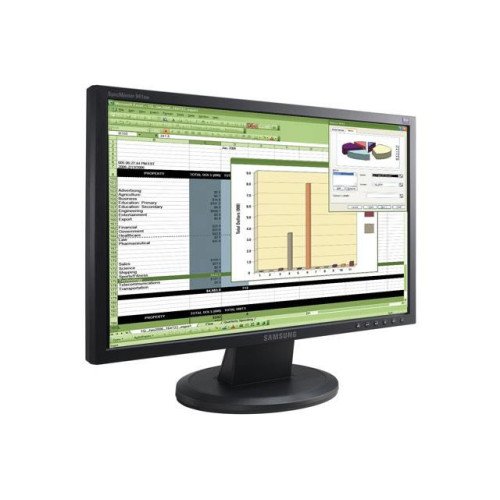
Samsung SyncMaster 941BW
The monitor Samsung SyncMaster 941BW is the ideal choice for users seeking quality and performance in a stylish and compact design. With a screen size of 19 inches, it offers excellent resolution that provides clear and detailed images, whether you are working, playing games, or watching movies.
With its innovative technology, SyncMaster 941BW ensures fast response times and vibrant colors, making the display of graphics and videos exceptionally enjoyable. The monitor is equipped with various inputs, allowing easy connection to different devices, such as computers and laptops.
Its design is sleek and modern, and the thin bezels add extra aesthetics. Additionally, Samsung SyncMaster 941BW offers height and tilt adjustment options, providing comfort during long hours of work.
In conclusion, if you are looking for a reliable and quality monitor, Samsung SyncMaster 941BW is the perfect choice for any home or office.
How to use
The Samsung SyncMaster 941BW monitor is easy to use and install. To get started, connect the monitor to the computer using the provided HDMI or VGA cable. Make sure the monitor is plugged into the power outlet and press the power button located on the front of the device.
Once the monitor is turned on, set the screen resolution in your operating system settings to take advantage of optimal image quality. The recommended resolution is 1440x900 pixels, which provides excellent clarity and detail.
If you wish to adjust the brightness and contrast, use the monitor's menu buttons to access the settings. Here you can also customize the color settings according to your preferences.
Finally, don't forget to familiarize yourself with the user manual, which will provide you with additional information about the features and capabilities of the Samsung SyncMaster 941BW.
Samsung SyncMaster 941BW
- Product Code: Product 6
- Availability: In Stock
-
$200.00
- Ex Tax: $200.00